

Before you start
This page answers common questions about Soundverse DNA. DNA creation has two current experiences:- Full Production DNA
- Voice DNA
1. What is DNA?
DNA is a Soundverse creator profile built from audio. It gives Soundverse material to process into available DNA models and track references. Those models and references can then appear in the DNA generation experience. DNA is not a promise that every upload produces the same number or type of results. The results depend on the supplied audio and the processing outcome.2. What is Full Production DNA?
Full Production DNA is the catalog-based DNA flow. Use it for songs, instrumentals, or acapellas that represent a creator’s sound. It builds and updates the creator’s primary DNA profile. Processing can produce music-style models and track references from that catalog. Use this flow when the goal is to represent a broader music catalog.3. What is Voice DNA?
Voice DNA is the voice-focused training flow. It uses clean solo-vocal recordings to train a voice model. It is separate from the Full Production upload and processing flow. In the current primary workflow, the trained voice model is attached to the creator’s primary DNA profile. Voice DNA does not replace the music catalog already associated with Full Production DNA.4. What is the difference between Full Production DNA and Voice DNA?
Full Production DNA learns from music catalog material. Voice DNA learns from recordings of one speaker or singer. Full Production DNA has a sensitivity control for catalog processing. Voice DNA has an epoch-based quality control for voice training. Choose the flow that matches the material you are uploading.5. What is a primary DNA profile?
The primary DNA profile is the current Full Production home for a creator. New catalog uploads and later processing runs are added to that profile. Existing models and tracks stay in place while new material is added. The primary profile is intended to be the continuing home for the creator’s DNA work.6. How many primary Full Production DNA profiles can I create?
The current Full Production flow maintains one primary DNA profile per owner. It does not create a second primary Full Production DNA profile for the same owner. Instead, add more authorized audio to the existing primary profile. Then run processing again when the new upload is ready to process. Older legacy DNA entries can still appear for some accounts. They do not change the one-primary behavior of the current creation flow.7. Can I upload more music after my first Full Production DNA run?
Yes. The current primary flow is designed for later uploads and processing runs. New models and track results are added to the existing primary DNA profile. Your earlier models and tracks are intended to stay in place. This is different from creating a separate primary DNA.8. Who should use Full Production DNA?
Use Full Production DNA when you want to represent a creator’s musical catalog. Good examples include songs, instrumentals, and acapellas that belong to the same creator or sound direction. The upload collection should reflect what you want the DNA to learn. An organized catalog is easier to reason about than unrelated files gathered only to increase the count.9. Who should use Voice DNA?
Use Voice DNA when the goal is to train a voice-focused model. The source material should be recordings of one speaker or singer. Do not mix several people into the same voice-training dataset. Voice DNA is not the right flow for a mixed song catalog with multiple vocalists and backing music.10. Do I need permission to upload audio?
Yes. For Full Production DNA, confirm that you have ownership and authority to upload the material. For Voice DNA, confirm that the voice is yours or that you have the singer’s consent to clone it. Do not use audio merely because it is publicly available online. The upload confirmation is not a substitute for obtaining the rights you need.11. Can I upload someone else’s voice?
Only if you have that speaker’s or singer’s consent. The Voice DNA flow requires a consent confirmation before training can start. Do not treat the presence of a voice recording as evidence of consent. If consent is unclear, do not train the voice.12. Where do I start a DNA?
Open the DNA area in Soundverse. Choose the training option that matches your goal. Use Full Production DNA for a music catalog. Use Voice DNA for solo-vocal voice training. The current Full Production flow opens the primary DNA profile rather than a blank second primary profile.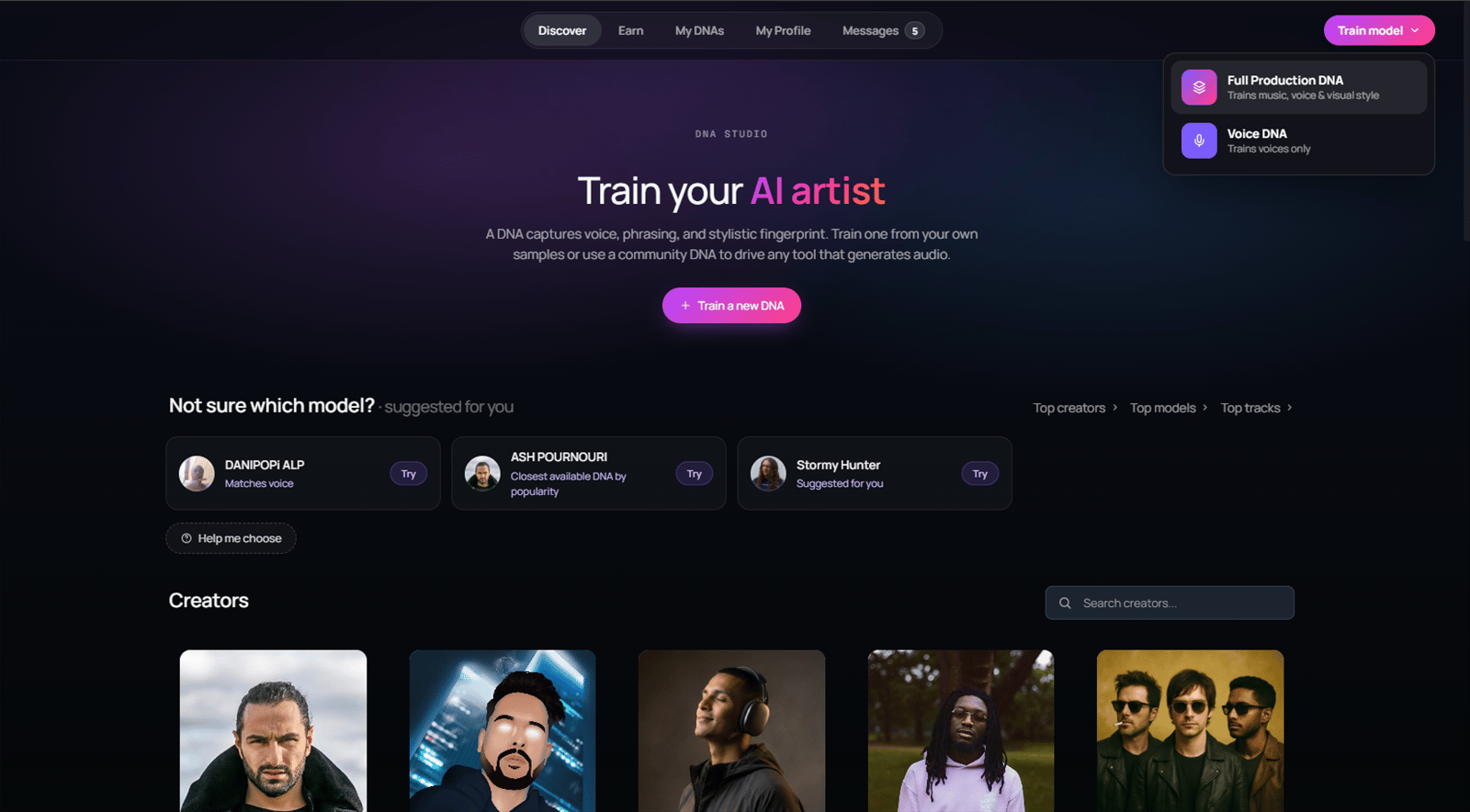
13. What are the Full Production DNA steps?
The current Full Production DNA flow has five steps:- Profile Settings
- Upload Section
- Process DNA
- Advanced
- Finalize
14. What audio formats can I use for Full Production DNA?
The current Full Production upload control accepts:- .mp3
- .wav
- .aac
- .ogg
- .flac
- .m4a
15. How many files can I upload for Full Production DNA?
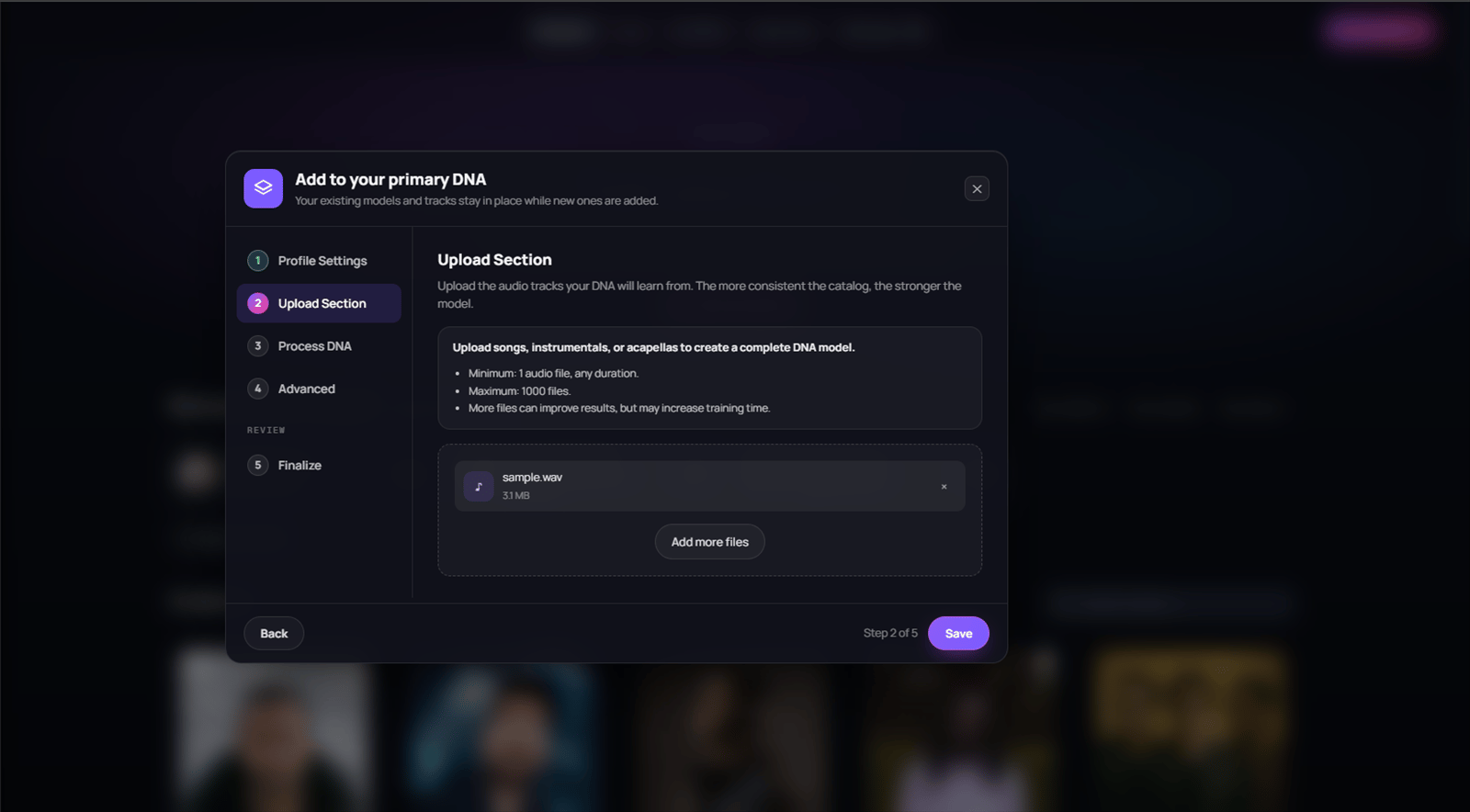
The current Full Production flow accepts at least one audio file. There is no minimum duration requirement in the current upload text. The current maximum is 1,000 audio files. More files are not automatically better. Choose files that represent the sound you want the primary DNA to learn.16. What kind of Full Production files should I choose?
The interface supports songs, instrumentals, and acapellas. Choose material that is relevant to the intended DNA sound. For example, a catalog can contain works that share a creator, style direction, or production identity. Avoid treating the upload as a general file dump. The processing output can vary when the source collection has very different material.17. Is an acapella a Voice DNA recording?
Not automatically. An acapella can be uploaded to the Full Production DNA catalog flow. Voice DNA is specifically for clean solo-vocal recordings used to train a voice-focused model. Use the Voice DNA requirements when the goal is voice training. Use the Full Production rules when the goal is catalog-style processing.18. What does the Full Production ownership confirmation mean?
It is the in-product confirmation that you have the authority to upload the selected music files. Read it carefully before continuing. It applies to each file you include in that Full Production upload. Do not check it for material that you are not authorized to use.19. What happens while a Full Production upload is running?
The Full Production uploader transfers each selected audio file through an upload session. The interface reports upload progress. Keep the file names and the selected files available until the upload has finished. Do not assume that a file is usable for processing until the upload completes successfully.20. Can a Full Production upload resume after a temporary interruption?
The current uploader keeps local checkpoints for a valid upload session. When possible, it can re-read the session and avoid re-sending chunks that were already confirmed. If a temporary error occurs, retry with the same file selection. An expired or invalid upload session may need a new server-issued session. The uploader surfaces non-retryable failures instead of silently pretending that the file completed.21. What should I do if a Full Production upload fails?
First, keep the source files available. Check that each file is an accepted audio format. Retry the upload with the same file selection. If it fails again, note the error text, approximate time, and the file count. Do not start processing until the upload area shows that the files are ready.22. Can I cancel a Full Production upload?
The current upload code supports an explicit cancellation path. Do not rely on closing the browser tab as a documented cancellation workflow. Use the control that the product exposes when a cancel option is available. If you are unsure whether a transfer completed, return to the DNA flow and check the visible upload state before processing.23. What can I edit in Full Production Profile Settings?
The primary profile flow includes fields for the creator name. It also includes a description, tags, and cover art. The current description field is limited to 300 characters. Use a clear name and description so you can recognize the profile later. Tags are useful for organizing the profile in the product.24. Do I need a cover image?
The creation flow provides a cover-art area. You can use the available cover controls when you want the primary DNA profile to have custom artwork. Cover art does not replace the uploaded audio. The audio catalog is still what the Full Production processing flow uses.25. What do Full Production tags do?
Tags are profile metadata shown in the creation flow. Use concise words that help describe or organize the DNA. The app provides suggested tags as well as an input for your own tags. Tags do not guarantee that a particular model, track, or output style will be produced.26. What does the Full Production sensitivity control do?
Full Production DNA uses a sensitivity slider from 0 to 10. The default value is 5. Lower sensitivity is described as producing broader genre DNA results. Higher sensitivity is described as producing more niche style DNA results. Sensitivity changes how the uploaded catalog is processed. It does not create additional primary DNA profiles.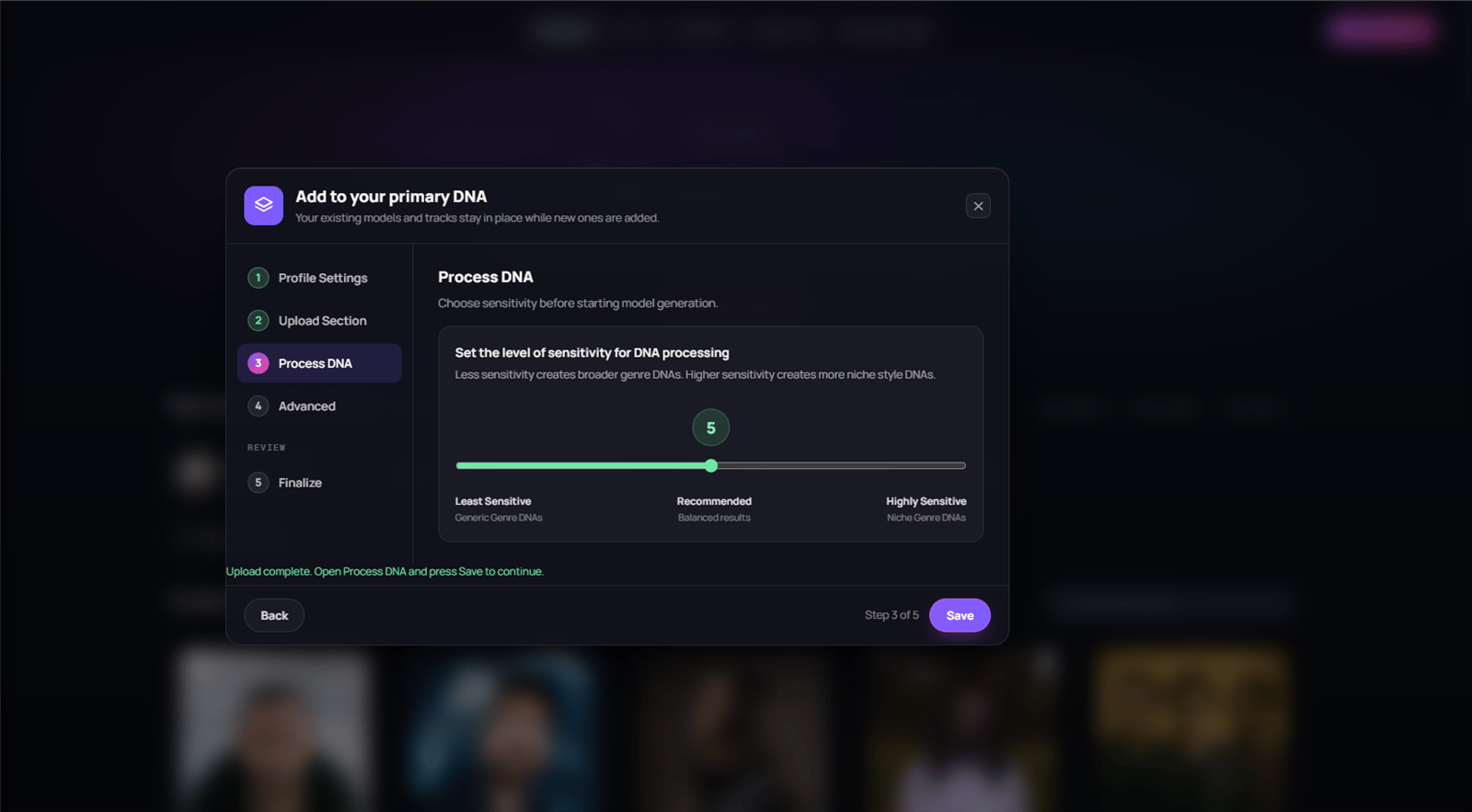
27. What is a good Full Production sensitivity to start with?
The current default is 5. The interface labels that middle area as balanced. Use a lower value when you want broader genre-style grouping. Use a higher value when you want more niche style grouping. There is no source-backed rule that one sensitivity value is best for every catalog.28. When does Full Production processing actually start?
Processing starts from the Process DNA step. The app requires uploaded audio that is ready to process. It sends the pending audio identifiers and the selected sensitivity to the processing flow. The Finalize step does not replace the Process DNA start action.29. Why can I not start Full Production processing twice?
The current flow prevents another processing run while DNA processing is already running for that primary DNA. This protects the current model run from being started again immediately. Wait for the active run to finish before starting another run. Return to My DNA to check whether new models or tracks have appeared.30. What happens when I process new Full Production uploads?
The primary flow uses an additive mode for later uploads. It keeps the existing core playlists rather than clearing them before re-clustering. New processing can add results to the primary DNA. It is not a promise that every run creates a new visible style model. Results depend on the processed catalog.31. What happens after Full Production processing completes?
Soundverse can add model and track results to the primary DNA profile. The processing pipeline can classify available audio with song, vocal, or instrumental reference information and style-related tags. Not every catalog produces every possible reference type. Do not expect a fixed number of models, tracks, or tags from every run.32. Will I receive an email when my Full Production model is ready?
Soundverse attempts to send a model-ready email after a completed Full Production model run. That email is best effort. The persisted model result is available to the product before the email attempt can affect it. An email delivery problem should not make a completed model disappear. Check My DNA for the authoritative in-product result.33. Do I need to keep the page open while Full Production DNA processes?
No. Once processing has started, you can leave the page and return later. Use My DNA to review the result. Do not rely only on an email because delivery is best effort.34. What are the Advanced settings in Full Production DNA?
The current Advanced area includes:- Advanced Options
- Tagging & Categorization
- Review
35. What can I configure under Full Production Advanced Options?
The current UI includes controls for:- Visibility
- Price
- License
- Track visibility
- Become Partner
36. What visibility choices does Full Production DNA have?
The current Full Production creation UI offers:- Public
- Private
- Personal
37. Does Public visibility immediately put my DNA in Discover?
No. A DNA must be both Public and Approved before it is eligible for public discovery. Public visibility is necessary but not sufficient. Approval is a separate status requirement.38. What moderation statuses can a DNA have?
The DNA contract includes statuses such as:- Pending
- Approved
- Rejected
- On hold
39. What does Pending mean for public discovery?
Pending means the DNA has not reached the Approved state required for public discovery. Keep the DNA’s actual status in view when deciding whether it should be public. Do not promise a public link to other people until the product shows that the DNA is eligible. This documentation does not promise a review time or outcome.40. What does Private or Personal mean for Full Production DNA?
Private and Personal are not public discovery states. They are useful while you are setting up, testing, or keeping a DNA outside public discovery. Public discovery still requires Public visibility and Approved status. Use the actual product controls and statuses shown for your DNA.41. Can I set a Voice DNA to Personal?
The current Voice DNA settings step shows private and public visibility options. Do not assume that Voice DNA exposes the same three visibility choices as Full Production DNA. Use the visibility value available in the Voice DNA form.42. What happens in the Full Production review area?
The current Review area has tabs for:- Models
- Tracks
- Voice Models
43. What are model references?
Model references are available DNA models that can be selected in the generation experience. They represent a broader DNA model starting point when the interface makes them available. Availability depends on the selected DNA and the processing result. Do not assume that every DNA has the same model list.44. What are track references?
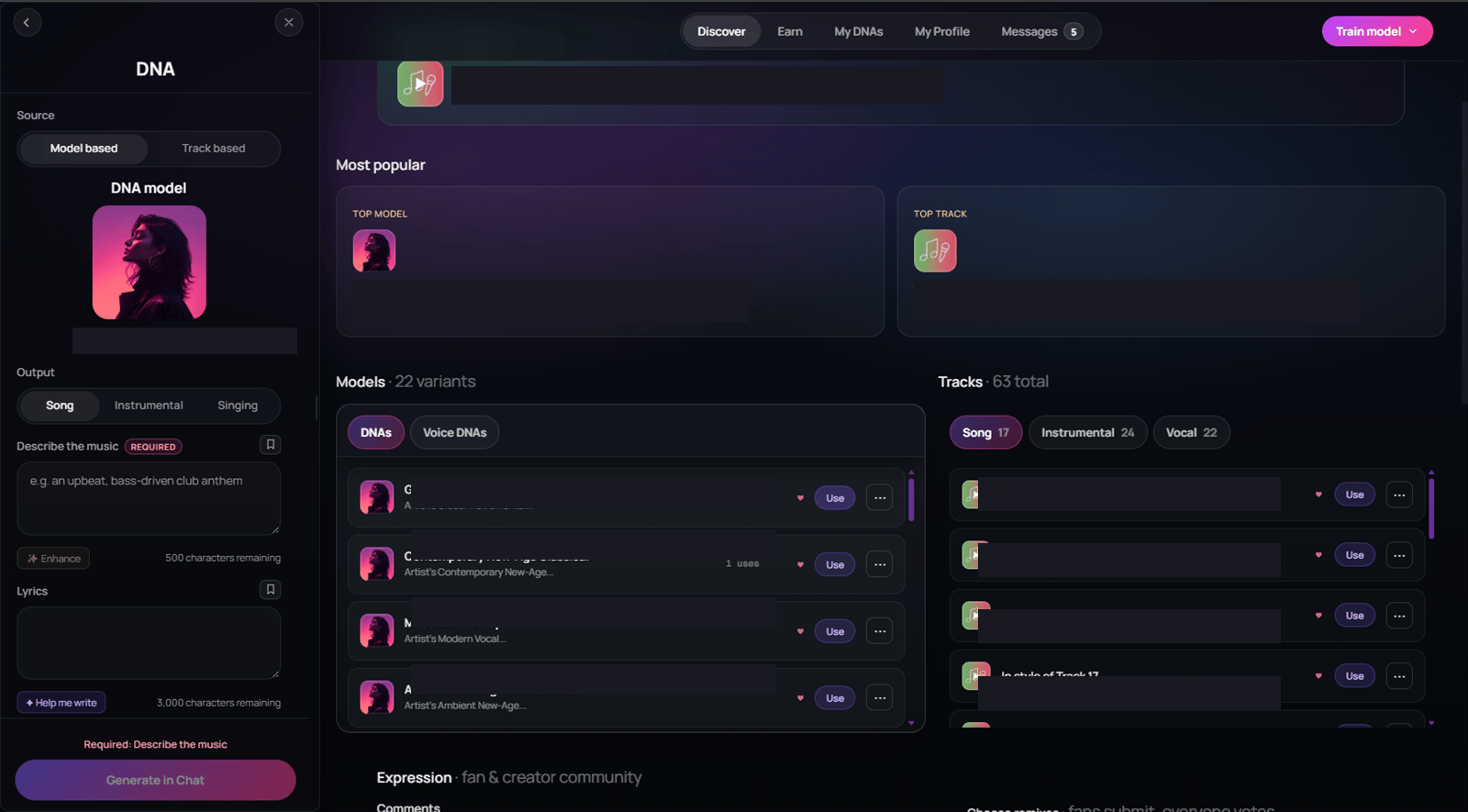
Track references are available processed audio references associated with a DNA. The interface can categorize them as song, vocal, or instrumental references. Choosing a track reference narrows the musical starting point for the available generation flow. It does not guarantee that every generation control will be enabled.45. What generation styles does the current DNA contract support?
The current DNA generation contract accepts:- Song
- Instrumental
46. Why is a generation option missing or disabled?
Generation controls are context-aware. They depend on the selected DNA, available model, and selected track reference. Use the controls that are enabled for the current selection. If an option is absent, that selection does not currently support it. Changing to another available model or reference can change the controls shown.47. Can a vocal reference generate a standalone vocal output?
Do not assume that it can. A vocal reference can appear in the interface as a type of track reference. The current generation request contract still maps available generation to Song or Instrumental. Use the enabled product controls rather than expecting a separate universal vocal output.48. What are the Voice DNA steps?
The current Voice DNA flow has five steps:- Voice Profile
- Upload Recordings
- Settings
- DNA Quality
- Finalize
49. What should I upload for Voice DNA?
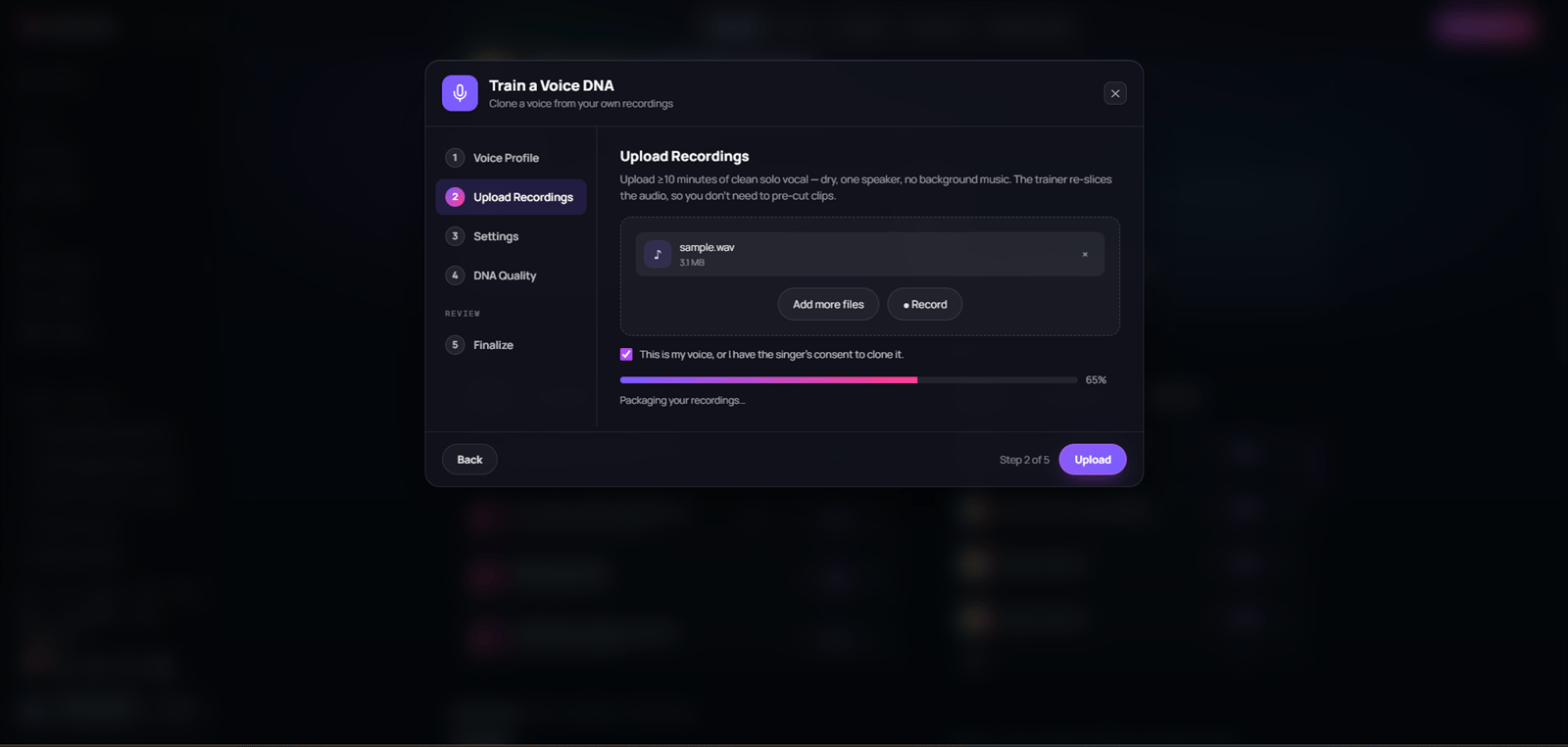
Upload clean solo-vocal recordings. Aim for at least 10 minutes of usable voice audio. Use one speaker or singer only. Avoid background music and heavy effects. The trainer can re-slice the recording, so you do not need to pre-cut every clip.50. What audio formats can I use for Voice DNA?
The current Voice DNA upload control accepts:- .mp3
- .wav
- .aac
- .ogg
- .flac
- .m4a
51. Is one Voice DNA recording enough to continue?
The current Voice DNA form requires at least one recording. The product guidance still says to aim for at least 10 minutes of clean solo-vocal audio. One short file may satisfy the minimum form check but may not represent a useful training dataset. Use the guidance, not only the minimum validation, when preparing voice material.52. Can I record audio directly in the Voice DNA flow?
The current Voice DNA upload area includes a Record control. It also lets you select files or drag audio files into the upload area. Browser microphone permissions and recording availability depend on the device and browser. Use a clean recording before beginning training.53. What information can I enter for a Voice DNA profile?
The Voice DNA profile area includes:- Creator Name
- Description
- Tags
- Cover image or avatar selection
54. Can Voice DNA be attached to an existing profile?
The Voice DNA interface contains a profile step. The current primary mode attaches the voice model to the canonical primary DNA and leaves the existing DNA content unchanged. Use the profile context shown in the current product flow. Do not expect Voice DNA training to replace your catalog models or tracks.55. What does Voice DNA consent require?
Before moving forward from the upload step, the current form requires:- At least one recording
- The consent confirmation
56. What is Voice DNA quality?
Voice DNA uses an epoch-based quality control. The range is 10 to 350 epochs. The default is 180 epochs. The current UI describes 40 to 200 epochs as a typical range. Higher values are described as taking longer while aiming for a higher-fidelity clone.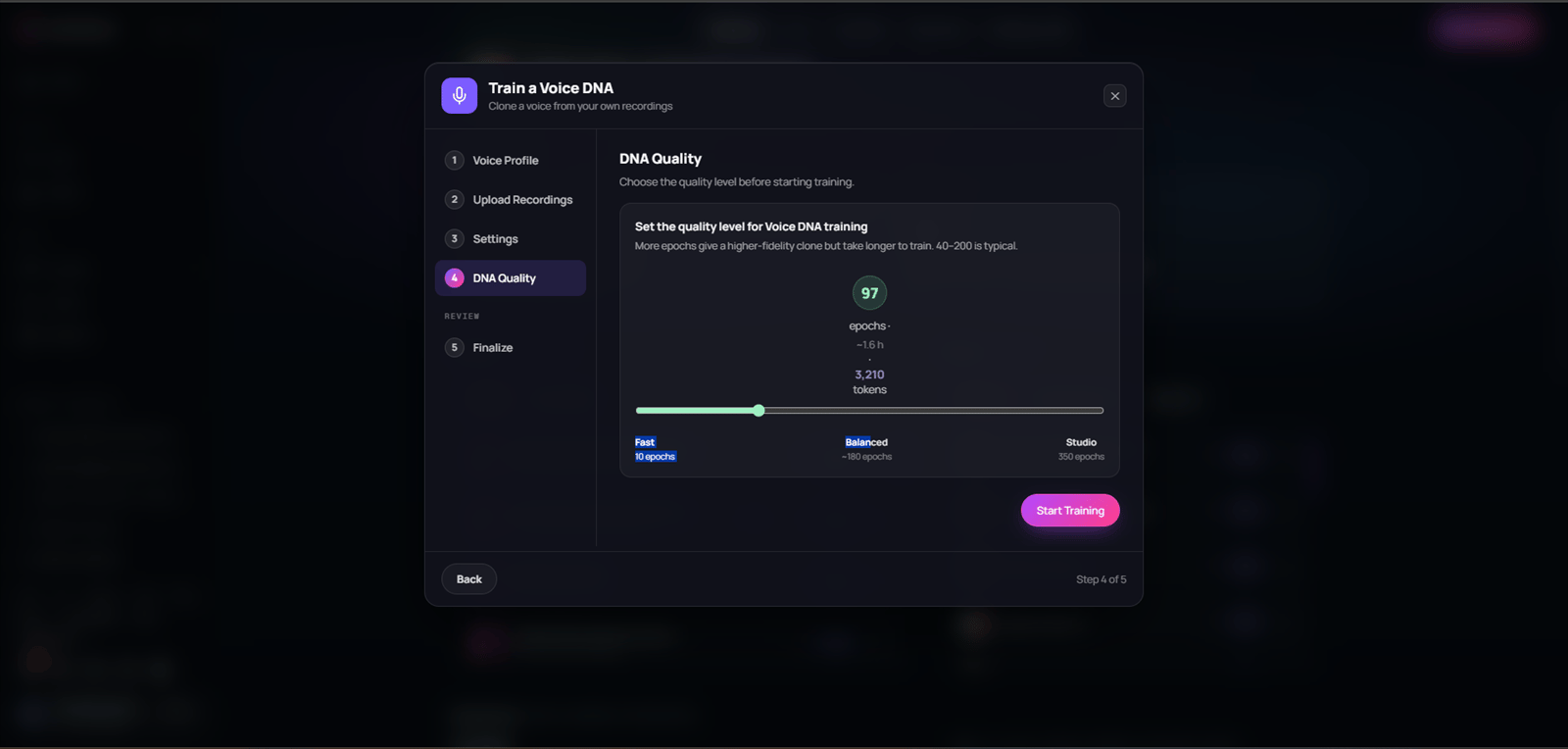
57. What should I choose for Voice DNA quality?
Start with the balanced default unless you have a clear reason to change it. The current labels are:- Fast: 10 epochs
- Balanced: about 180 epochs
- Studio: 350 epochs
58. When does Voice DNA training start?
Voice training starts when you select Start Training on the DNA Quality step. The app validates the profile and upload requirements before submission. It then moves to Finalize and begins showing the current training state.59. What does the Voice DNA Finalize step show?
Finalize shows a summary of the Voice DNA. It shows the progress bar and status while the model is being prepared or trained. When the model is ready, it provides a way to view it in the profile. If training fails, the UI reports the failure and returns you to the quality step so you can retry.60. What Voice DNA training states can I see?
The current training view can show:- Queued
- Preparing or processing
- Training progress by epoch
- Completed
- Failed
61. Can I close the Voice DNA window while it trains?
Yes. The current UI states that the training keeps running when you close the window. The trained result appears under the profile’s Voice DNAs when it is ready. Return to the profile to inspect the finished model.62. What should I do if Voice DNA upload fails?
Check that the recordings are accepted audio files. Confirm that at least one recording is selected. Confirm the consent checkbox. Retry the upload after reading the visible error message. If it continues to fail, keep the error text and the approximate time for support.63. What should I do if Voice DNA training fails?
Read the status shown in Finalize. The current UI returns to the DNA Quality step after a start failure so you can retry. Check the voice material, consent confirmation, selected quality, and current product availability. Do not create a new training request repeatedly while a previous request is still showing active progress.64. Where can I manage my DNA after training?
Use My DNA to review your primary DNA, available models, tracks, and voice models. It is the right place to check the in-product result after Full Production processing or Voice DNA training. Use the status shown in the product rather than relying only on a notification.65. What is Discover?
Discover is the public DNA browsing area. Only DNA content that satisfies the product’s public eligibility rules can appear there. For the current Full Production path, that requires Public visibility and Approved status.66. What is Earn?
The Earn area contains the current Stripe Connect flow for creator earnings where it is available. When no Stripe account is connected, it presents a connection action. When an account is connected, it can show the current DNA dashboard summary and a way to open Stripe. Use the in-product dashboard for the information currently available to your account.67. Does connecting Stripe guarantee a payout?
No. Stripe connection is not itself a guarantee of payout eligibility, royalty amount, payout timing, or commercial rights. The current terms, pricing, licenses, eligibility rules, account status, and Stripe requirements all matter. Read the applicable in-product information before making financial or release decisions.68. What do the Full Production price and license controls guarantee?
They configure values presented in the product. They do not independently explain every legal, commercial, or payout effect. Read the current license label and Soundverse terms before releasing, distributing, or commercially using generated work. This FAQ is not legal advice.69. How do I prepare a useful support report for a DNA issue?
Include:- Whether the issue is Full Production DNA or Voice DNA
- The step where it happened
- The visible error message
- The approximate time and timezone
- The number and formats of the selected files
- Whether the issue is upload, processing, visibility, generation, or earnings
70. What should I check before reporting a missing DNA result?
Check the primary DNA in My DNA. Check whether the upload actually completed. Check whether processing is still active. Check whether you are looking at the intended model or track reference. For public discovery, check both visibility and approval status. For Voice DNA, check whether training reports Queued, Preparing, Training, Completed, or Failed.71. What should I avoid promising to collaborators or listeners?
Do not promise an exact processing duration. Do not promise a specific number of models or tracks. Do not promise public discovery before the DNA is both Public and Approved. Do not promise a payout merely because Stripe is connected. Do not promise a standalone vocal output from every vocal reference.72. Where can I find the full walkthrough?
Use the DNA Help Center for the full end-to-end guide. It covers preparation, each creation step, processing, visibility, generation, Voice DNA, earnings boundaries, and troubleshooting. Return to this FAQ when you need a quick answer to one specific question.More about DNA types and generation
73. Is Full Production DNA a voice clone?
No. Full Production DNA is the catalog-based flow for songs, instrumentals, and acapellas that represent a broader musical identity. It can include vocal material as part of a catalog, but it is not the dedicated flow for cloning one particular person’s voice. Use Voice DNA when the goal is to train a model from clean recordings of one speaker or singer.74. Does Voice DNA learn the production style of my songs?
No. Voice DNA is for the voice itself: one speaker or singer’s vocal character from clean solo-vocal recordings. It does not replace the catalog-based Full Production DNA flow for production style, songwriting context, instrumentals, arrangements, or a broader music catalog. Use both flows only when you have the required rights and each source set matches the intended training purpose.75. Can I use Full Production DNA and Voice DNA together?
Yes, when you have the rights and consent for both source sets. In the current primary workflow, Full Production DNA remains the home for catalog-based models and track references, while a trained Voice DNA model can be attached to that creator’s primary profile. Adding a Voice DNA does not replace the Full Production catalog already associated with that profile.76. What is Model Based generation?
Model Based generation uses an available DNA model as the broader creative starting point. Choose it when you want the generation experience to draw from the overall musical identity represented by the selected DNA model. The actual controls still depend on what the selected DNA and model support in the product.77. What is Track Based generation?
Track Based generation uses a specific processed reference from the DNA, such as a song, vocal, or instrumental reference. It is useful when you want a more focused starting point than the broader DNA model. The reference type does not guarantee that every output or control will be available. Use the options enabled for that reference.78. Which should I choose: Model Based or Track Based?
Choose Model Based when you want the overall DNA model to guide the result. Choose Track Based when one available song, vocal, or instrumental reference is closer to the specific direction you want. Neither mode changes the ownership of the DNA, the rights you need for your prompt, or the payment rules for a later paid export.79. Does generating with a DNA automatically create a sale or earning?
No. Creating or generating audio does not by itself create a creator earning. A creator earning is recorded only after a paid DNA export or a Fan Support payment is successfully verified through the product’s payment flow.Earnings and payouts
80. What payment activity creates a creator earning in Earn?
The current Earn ledger records two sources:- Paid DNA export
- Fan Support